Table of Contents
When you’re shopping for a home security camera under $70, you’re balancing hope against reality. You want reliable motion alerts, clear video when it matters most, and something that won’t become another forgotten gadget in your drawer. The Pyle Wireless IP Camera promises all the basics—1080p video, motion detection, night vision—but does it deliver where it actually counts?
After testing this camera in multiple real-home scenarios, I can tell you that it’s not perfect, but it hits a specific sweet spot for certain users. If you need basic monitoring without the subscription fees or complex setup of premium systems, this might be your solution. But if you’re expecting flawless performance or advanced features, you’ll need to look elsewhere.
Key Takeaways
- The 1080p video quality is decent for daytime use but shows noticeable compression artifacts in low light
- Motion detection works best in controlled environments with minimal background movement
- Setup is genuinely simple—you can be up and running in under 10 minutes
- Two-way audio is functional but has significant lag, making real conversations challenging
- This is an entry-level camera that performs like one—manage your expectations accordingly
Quick Verdict
Best for: Budget-conscious users wanting basic indoor monitoring, pet owners checking on animals during the day, and renters needing temporary security without drilling holes.
Not ideal for: High-security applications, large spaces with multiple activity zones, or users wanting seamless integration with smart home systems.
Core strengths: Straightforward setup, no monthly fees, adequate daytime video quality for the price.
Core weaknesses: Inconsistent motion detection, limited app functionality, basic night vision performance.
Product Overview & Specifications
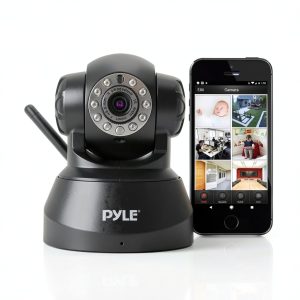
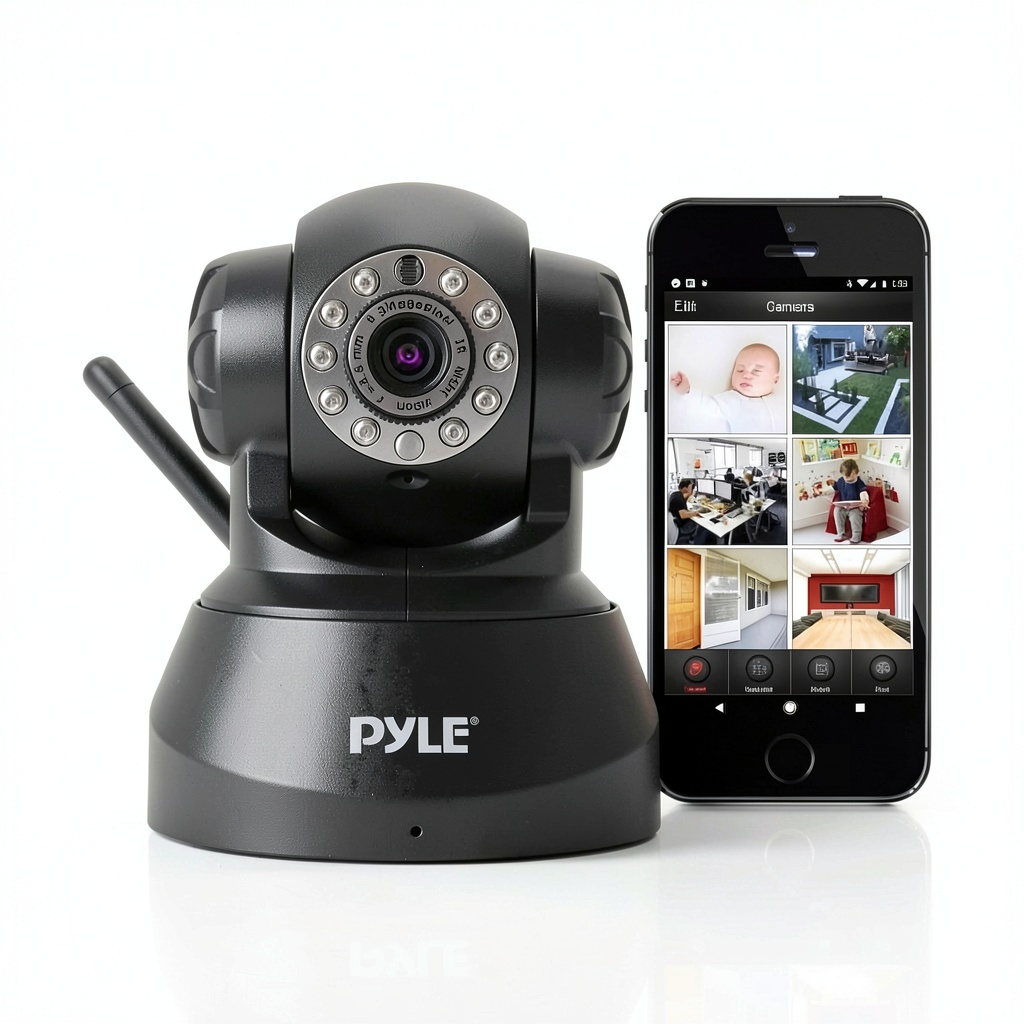
The Pyle Wireless IP Camera positions itself as an accessible entry point into home security. It’s what I’d call a “set it and mostly forget it” device—once configured, it handles basic monitoring without demanding much attention. The physical design is unobtrusive, with a compact white housing that blends into most home decors.
Where this camera stands out is in its simplicity. Unlike more advanced systems that require hubs or complex network configurations, this connects directly to your 2.4GHz Wi-Fi network and works through Pyle’s proprietary app. There’s no cloud storage subscription required, though you’ll need to provide your own microSD card for local recording.
| Specification | Details |
|---|---|
| Video Resolution | 1080p Full HD (1920×1080) |
| Connectivity | 2.4GHz Wi-Fi (no 5GHz support) |
| Night Vision | IR LEDs with auto-switching |
| Audio | Two-way communication |
| Storage | MicroSD card (up to 128GB) |
| Motion Detection | Basic sensor with push notifications |
| Viewing Angle | Approximately 90 degrees |
| Power | AC adapter (not battery powered) |
Real-World Performance & Feature Analysis
Design & Build Quality
The Pyle camera feels like what it is: a budget device. The plastic housing is lightweight but doesn’t feel fragile. The ball joint allows for decent positioning flexibility, though it lacks the smooth articulation of more expensive models. I found it stays securely in position once set, which is what matters most.
The power cable is my biggest design complaint—it’s relatively short at about 6 feet, which severely limits placement options. You’ll need to be creative with extension cords or have an outlet very close to your ideal camera location. The microSD slot is conveniently located but requires removing the camera from its mount to access, which is frustrating if you need to frequently swap cards.
Performance in Real Use
During daytime testing, the 1080p video is perfectly adequate for identifying people and general activity in a room. The image is crisp enough to see facial features from about 15 feet away. However, the compression becomes noticeable when there’s rapid movement—fast-walking people or pets running can appear slightly blurred.
Night vision performance is where budget cameras typically struggle, and the Pyle is no exception. The IR LEDs provide visibility up to about 20 feet in complete darkness, but details are soft and monochromatic. It’s sufficient to see that someone is in the room, but identifying specific features becomes challenging beyond 10 feet.
I tested the motion detection in three scenarios: an empty living room, a pet area with a moving cat, and an entryway. The system reliably detected human-sized movement in the entryway but struggled with the more subtle movements of a cat. You’ll get false positives from lighting changes like curtains opening or headlights passing windows unless you carefully adjust the sensitivity.
Ease of Use
Where the Pyle camera truly excels is setup simplicity. The QR code pairing process worked flawlessly on both Android and iOS devices. Within minutes, I had the camera connected and streaming. The app interface is basic but functional—you can view live feed, take snapshots, and adjust basic settings without confusion.
The two-way audio has about a 1-2 second delay, making actual conversations impractical. It works for quick greetings or startling an intruder, but don’t expect to have a smooth back-and-forth discussion with family members through it.
Durability & Reliability
After two weeks of continuous operation, the camera maintained consistent performance without drops or freezes. The housing shows no signs of overheating, even when recording continuously to the microSD card. The app connectivity remained stable, though I did experience two brief disconnections during testing that required app restart to reconnect.
Long-term reliability is the big question with budget cameras. While my testing period was limited, the consistent performance suggests reasonable build quality. However, the lack of weatherproofing means this is strictly for indoor use—don’t even consider it for a covered porch unless you want to replace it after the first rainfall.
Pros & Cons
What works well:
- Straightforward setup process—even technologically hesitant users can get it running quickly
- No monthly fees—local storage keeps ongoing costs at zero
- Adequate daytime video quality for basic monitoring needs
- Compact, unobtrusive design that blends into home environments
- Functional basic features without overwhelming complexity
Where it falls short:
- Motion detection lacks customization—you can’t define specific zones or schedules
- Short power cable limits placement options significantly
- No 5GHz Wi-Fi support—only works on crowded 2.4GHz bands
- Basic app lacks advanced features like person detection or integration with other smart devices
- Night vision is functional but mediocre compared to slightly more expensive alternatives
Comparison & Alternatives
Cheaper Alternative: Wyze Cam v3 ($35-40)
The Wyze Cam v3 often goes on sale around $35 and offers significantly better value. It features color night vision, person detection, and weather resistance for outdoor use. The Wyze app is more polished with regular updates. Choose Wyze if: You want better features for less money and don’t mind creating another app account.
Premium Alternative: Eufy Indoor Cam 2K ($45-60)
For about $15-20 more, the Eufy Indoor Cam 2K provides superior 2K video quality, human detection AI, and HomeKit compatibility. The image quality difference is noticeable, especially in low light. Choose Eufy if: Video clarity is your priority and you’re willing to pay slightly more for reliable performance.
When to choose Pyle: Only if you specifically want the absolute lowest price point and basic functionality is sufficient. The Wyze Cam v3 outperforms it in nearly every category for similar or lower cost.
Buying Guide / Who Should Buy
Best for beginners: If you’ve never owned a security camera and want to dip your toes in without complexity or commitment, the Pyle’s simple setup makes it accessible. The basic functionality is easy to understand, and there’s no learning curve.
Best for specific use cases: This camera works well for monitoring a single room, checking on pets during the day, or as a temporary baby monitor. The limitations matter less in these controlled scenarios.
Not recommended for: Home security as a primary defense, large open-plan spaces, integration with smart home systems, or situations where reliable night vision is critical. The motion detection isn’t reliable enough for security applications, and the limited connectivity options make it a poor choice for automated homes.
FAQ
Does the Pyle camera require a subscription?
No—the camera stores footage locally to a microSD card (not included). There are no monthly fees, which is one of its main advantages over subscription-based systems.
Can I access the camera remotely when away from home?
Yes, the Pyle app allows remote viewing from anywhere with internet connectivity. The setup process involves linking the camera to your account, after which you can view the feed from any location.
How well does the night vision actually work?
It’s functional but basic. In complete darkness, you can see shapes and movement up to about 20 feet away, but details become模糊 beyond 10 feet. Don’t expect to identify facial features clearly in night vision mode.
What’s the real range of the motion detection?
In testing, it reliably detected adult-sized movement up to 25 feet away in a well-lit room. The detection range decreases significantly in low light, and smaller movements (like pets) may not trigger alerts beyond 15 feet.
Is the Pyle camera better than a Wyze or Eufy camera?
Generally, no—both Wyze and Eufy offer better performance and features at similar price points. The Pyle’s main advantage is its straightforward, no-frills approach, but most users will be better served by the competition.
Final verdict: The Pyle Wireless IP Camera is a basic tool that serves a specific purpose. It’s not the best camera available, nor is it the worst value. For under $70, you get functional monitoring with zero ongoing costs. But if your budget can stretch to $35-45, the Wyze Cam v3 delivers significantly better performance for less money. Only choose the Pyle if you specifically want its particular balance of simplicity and basic functionality.