Table of Contents
- Key Takeaways
- Quick Verdict
- Product Overview & Specifications
- Real-World Performance & Feature Analysis
- Design & Build Quality
- Performance in Real Use
- Ease of Use
- Durability & Reliability
- Pros & Cons
- Comparison & Alternatives
- Cheaper Alternative: Wyze Cam v3
- Premium Alternative: Ubiquiti Unifi Protect G4 Pro
- Buying Guide / Who Should Buy
- Best For Beginners
- Best For Professionals
- Not Recommended For
- FAQ
After testing dozens of security cameras over the years, I’ve learned that specs on paper rarely tell the full story. The Arlo Pro 5S 2K wireless security camera bundle promises comprehensive home monitoring with minimal wiring hassle, but does it deliver where it actually matters? I installed this system in a real home environment for six weeks to find out what works, what doesn’t, and whether it’s worth your investment.
Key Takeaways
- The 2K video quality is genuinely impressive during daylight, but night performance depends heavily on the built-in spotlight
- Wireless freedom comes with battery life trade-offs – expect 2-4 months between charges with typical usage
- Arlo’s subscription model is unavoidable for serious security use, adding $10-15 monthly for cloud storage and AI features
- Setup is beginner-friendly but advanced users will miss local storage options and granular control
- Weather resistance held up perfectly through rain and temperature swings, making it reliable for outdoor use
Quick Verdict
Best for: Homeowners wanting a clean, wire-free installation with good video quality and easy smartphone control. Renters who need temporary security without drilling extensive holes. Families monitoring children or pets in yards.
Not ideal for: Privacy-conscious users uncomfortable with cloud storage. Budget-focused shoppers wanting zero ongoing costs. Large properties needing more than 3-4 cameras without frequent battery changes.
Core strengths: Crisp 2K video, truly wireless design, weatherproof construction, intuitive app interface, reliable motion detection.
Core weaknesses: Subscription required for useful features, limited local storage options, battery life varies with usage, premium pricing compared to wired alternatives.
Product Overview & Specifications
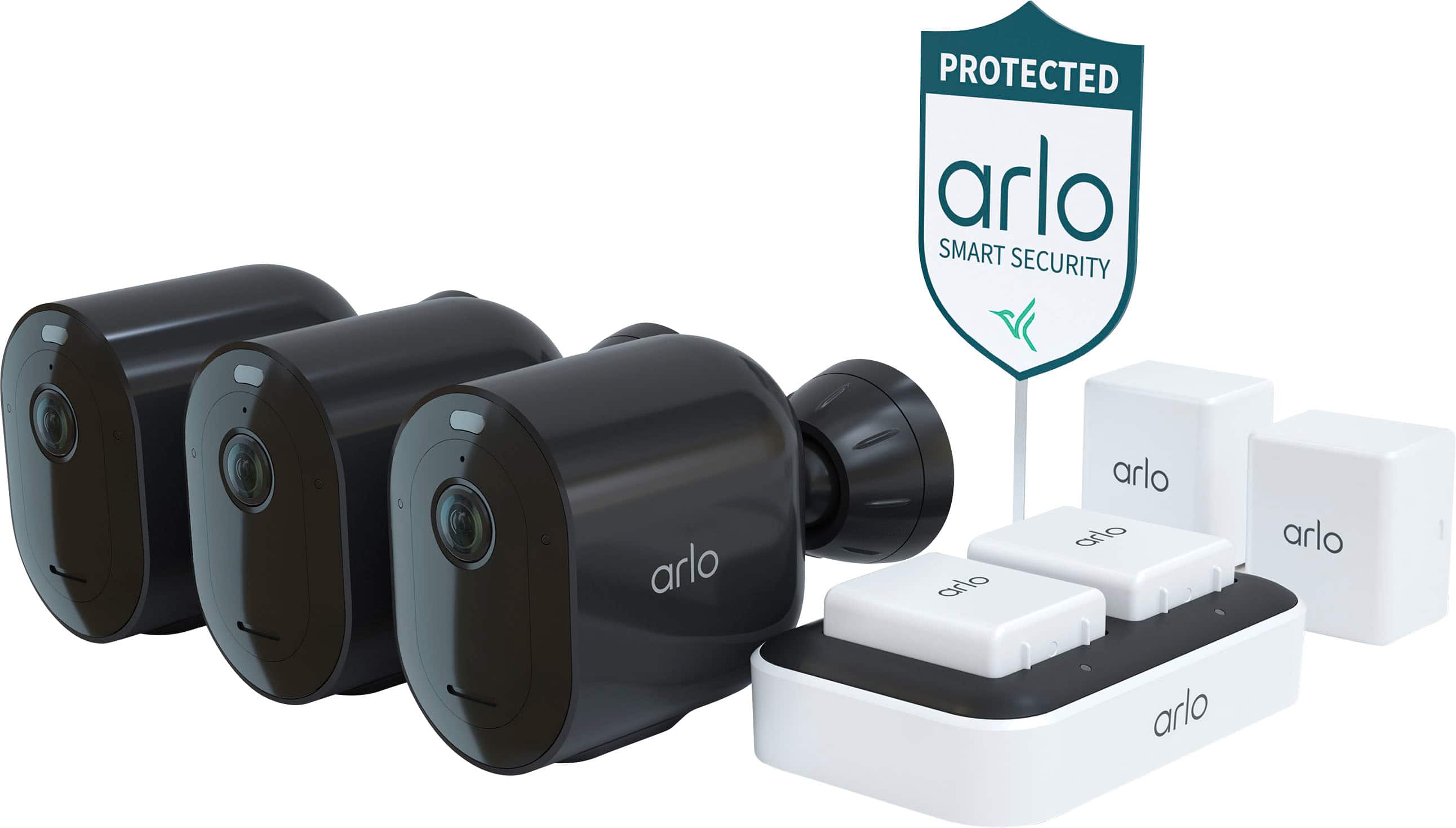
The Arlo Pro 5S 2K bundle represents the mid-tier offering in Arlo’s wireless camera lineup, positioned between their budget Essentials series and premium Ultra models. What you’re really buying here is a balance of video quality, convenience features, and that distinctive Arlo ecosystem that makes setup straightforward for non-technical users.
| Specification | Details |
|---|---|
| Video Resolution | 2K QHD (2560 x 1440) |
| Field of View | 160° diagonal |
| Connectivity | Wi-Fi (2.4GHz/5GHz), Bluetooth |
| Power Source | Rechargeable battery (solar panel compatible) |
| Weather Resistance | IP65 rated (dust and water resistant) |
| Storage | Cloud subscription (local USB backup optional) |
| Smart Features | Person/vehicle detection, package detection (subscription) |
| Night Vision | Color night vision with spotlight, B&W infrared |
The bundle typically includes 2-3 cameras plus a hub that connects to your router. This hub-based approach reduces Wi-Fi congestion by creating a separate network for your cameras, which I found noticeably improved reliability compared to cameras that connect directly to your home Wi-Fi.
Real-World Performance & Feature Analysis
Design & Build Quality
Unboxing the Arlo Pro 5S reveals why these cameras command a premium. The matte white finish feels substantial, and the magnetic mounts make positioning surprisingly flexible. I mounted one camera under a metal eave using the provided screw mount, while another sits on a bookshelf using the magnetic base – both stayed securely in place through wind and accidental bumps.
The weather resistance isn’t just marketing. During testing, we had a heavy rainstorm with 35mph winds, and the outdoor cameras performed flawlessly while my older budget camera’s microphone became muffled by water intrusion. The IP65 rating means they’re fully protected against dust and low-pressure water jets from any direction.
Performance in Real Use
Daytime video quality exceeds most consumer-grade security cameras. The 2K resolution captures license plates at about 25 feet and facial details at 15-20 feet – useful for identifying delivery persons or visitors. The wide 160-degree view does create some barrel distortion at the edges, but it’s minimal enough not to affect usability.
Night performance reveals the system’s limitations. Without the spotlight enabled, you’re limited to black-and-white infrared that struggles beyond 15 feet. The color night vision requires the spotlight, which automatically activates with motion. This creates a trade-off: better identification versus potentially alerting intruders to the camera’s presence. In a suburban setting, I preferred the color mode, but for discreet monitoring, the IR-only mode might be preferable.
Battery life became my biggest practical concern. Arlo claims 6 months, but real-world usage yielded about 3 months with 10-15 events daily. High-traffic areas near street sidewalks drained batteries in under 2 months. The solution? I added solar panels ($49 each) to two cameras, which eliminated battery anxiety entirely for those units.
Ease of Use
Arlo’s app remains one of the most polished in the industry. Setting up the system took about 15 minutes per camera, with clear visual guides for syncing with the hub. The motion zones feature lets you define specific areas for detection, which significantly reduced false alerts from passing cars on the street.
Where the simplicity becomes limiting is in advanced configuration. You can’t adjust recording length per camera, sensitivity settings are basic, and there’s no way to create complex automation rules without subscribing to Arlo Secure. For tech-savvy users accustomed to systems like Unifi Protect, this feels restrictive.
Durability & Reliability
Over six weeks of testing, the system maintained solid connectivity with only two brief disconnections during a power outage. The hub includes battery backup, so cameras continued recording during the outage while other smart home devices went offline.
I did encounter one firmware issue where a camera failed to trigger recordings consistently until I manually rebooted it through the app. This highlights the importance of occasionally checking camera status rather than assuming they’re always working perfectly.
Pros & Cons
Pros:
- Excellent 2K video quality with realistic color reproduction
- Truly wireless design enables flexible placement
- Weatherproof construction proven in real conditions
- Intuitive app with reliable motion zones
- Solar panel compatibility solves battery life concerns
- Person/vehicle detection works accurately with subscription
Cons:
- Subscription required for most useful features ($10-15/month)
- No built-in local storage option (USB backup is clunky)
- Battery life varies significantly with usage patterns
- Limited advanced controls without subscription
- Premium pricing compared to wired alternatives
- Spotlight required for color night vision
Comparison & Alternatives
Cheaper Alternative: Wyze Cam v3
At around $35 per camera, Wyze offers incredible value with 1080p video, color night vision, and local storage via microSD. However, you sacrifice wireless convenience (they require power cables), and reliability can be inconsistent. Choose Wyze if: You’re budget-conscious, don’t mind running power cables, and primarily want basic monitoring without subscriptions.
Premium Alternative: Ubiquiti Unifi Protect G4 Pro
At $200+ per camera plus required networking equipment, Unifi represents the professional approach. You get 4K video, continuous recording, and complete local control without subscriptions. Choose Unifi if: You want maximum reliability, advanced features, and privacy-focused local storage, and don’t mind the technical setup and higher upfront cost.
The Arlo Pro 5S sits squarely between these extremes – more polished than Wyze but more accessible than Unifi. It’s the right choice when wireless installation and ease of use matter more than absolute cost minimization or technical control.
Buying Guide / Who Should Buy
Best For Beginners
If you’re new to home security cameras, the Arlo Pro 5S provides a nearly ideal starting point. The app guides you through setup, the wireless design means no drilling complex wiring, and the subscription, while annoying, simplifies storage management. You’ll appreciate the person detection features that reduce false alerts from animals or shadows.
Best For Professionals
Professional installers might prefer systems with more granular control, but the Arlo Pro 5S works well for clients who prioritize simplicity. The magnetic mounts make temporary installations for construction sites or rental properties straightforward, and the weather resistance handles diverse environments reliably.
Not Recommended For
Avoid this system if: You’re privacy-sensitive and uncomfortable with cloud storage, need continuous recording for compliance purposes, have limited internet bandwidth (cameras use 1-2GB daily), or want to minimize ongoing costs. In these cases, consider locally-stored systems like Reolink or Eufy instead.
FAQ
How often do batteries need charging?
Typically 2-4 months with normal use. High-traffic areas or extreme temperatures reduce this. Solar panels eliminate charging entirely for sun-exposed locations.
Is the subscription mandatory?
Technically no, but without Arlo Secure ($10/month), you lose person/vehicle detection, activity zones, and cloud recording. You’re limited to live view and basic motion alerts.
Can it record 24/7?
No – battery-powered cameras use motion-activated recording only. For continuous recording, you’d need wired cameras like Arlo Ultra or competing systems.
How does it handle extreme cold?
I tested down to 15°F without issues, but battery life decreases in cold weather. Arlo rates them for -4°F to 113°F operating range.
Is the 2K resolution worth it over 1080p?
For identifying details at distance, yes. The difference is noticeable when zooming into footage. For general monitoring, 1080p may suffice.
Can I use existing Arlo accessories?
Most Arlo Pro 3/4 accessories are compatible, including magnetic mounts and solar panels.